Rendering with custom renderer
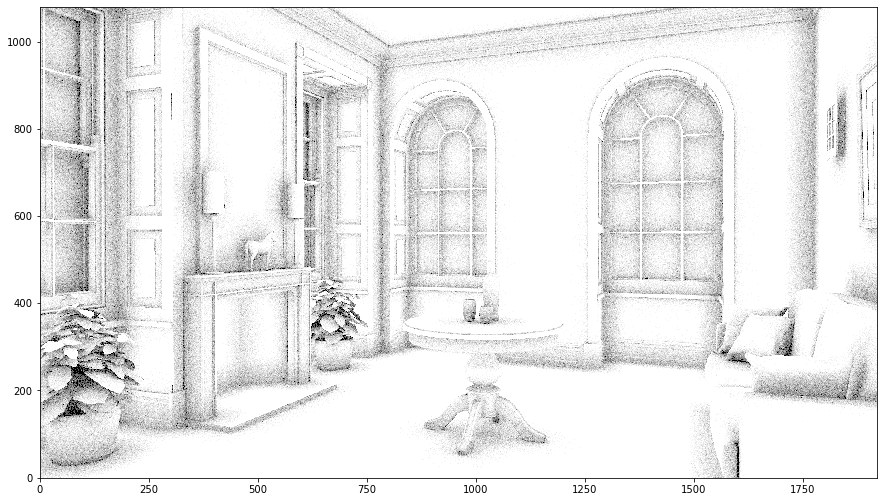
This example demostrates how to create user-defined renderer by implementing lm::Renderer interface. The implementation is defined in renderer_ao.cpp (code):
#include <lm/lm.h>

LM_NAMESPACE_BEGIN(LM_NAMESPACE)

class Renderer_AO final : public Renderer {
private:
    Film* film_;
    long long spp_;
    int rngSeed_ = 42;

public:
    virtual bool construct(const Json& prop) override {
        film_ = comp::get<Film>(prop["output"]);
        if (!film_) {
            return false;
        }
        spp_ = prop["spp"];
        return true;
    }

    virtual void render(const Scene* scene) const override {
        const auto [w, h] = film_->size();
        parallel::foreach(w*h, [&](long long index, int threadId) -> void {
            thread_local Rng rng(rngSeed_ + threadId);
            const int x = int(index % w);
            const int y = int(index / w);
            const auto ray = scene->primaryRay({(x+.5_f)/w, (y+.5_f)/h}, film_->aspectRatio());
            const auto hit = scene->intersect(ray);
            if (!hit) {
                return;
            }
            auto V = 0_f;
            for (long long i = 0; i < spp_; i++) {
                const auto [n, u, v] = hit->geom.orthonormalBasis(-ray.d);
                const auto d = math::sampleCosineWeighted(rng);
                V += scene->intersect({hit->geom.p, u*d.x+v*d.y+n*d.z}, Eps, .2_f) ? 0_f : 1_f;
            }
            V /= spp_;
            film_->setPixel(x, y, Vec3(V));
        });
    }
};

LM_COMP_REG_IMPL(Renderer_AO, "renderer::ao");

LM_NAMESPACE_END(LM_NAMESPACE)
In this time, we implemented two functions: lm::Component::construct() and lm::Renderer::render(). lm::Component::construct() function provides a type-agnostic way to initialize the instance with JSON values. You want to implement main logic of the renderer inside the lm::Renderer::render() function. We will not explain the detail here, but this renderer implements a simple ambient occlusion. As for the usage of APIs, please refer to the corresponding references for detail.
[1]:
import os
import numpy as np
import imageio
%matplotlib inline
import matplotlib.pyplot as plt
import lmfunctest as ft
import lightmetrica as lm
%load_ext lightmetrica_jupyter
[2]:
lm.init()
lm.log.init('logger::jupyter')
lm.progress.init('progress::jupyter')
lm.info()
[I|0.000|114@user ] Lightmetrica -- Version 3.0.0 (rev. fe30e7c) Linux x64
[3]:
lm.comp.loadPlugin(os.path.join(ft.env.bin_path, 'functest_renderer_ao'))
[I|0.010|179@compon] Loading plugin [name='functest_renderer_ao']
[I|0.010|197@compon]   Successfully loaded
[3]:
True
[4]:
# Film for the rendered image
lm.asset('film1', 'film::bitmap', {
    'w': 1920,
    'h': 1080
})

# Pinhole camera
lm.asset('camera1', 'camera::pinhole', {
    'position': [5.101118, 1.083746, -2.756308],
    'center': [4.167568, 1.078925, -2.397892],
    'up': [0,1,0],
    'vfov': 43.001194
})

# OBJ model
lm.asset('obj1', 'model::wavefrontobj', {
    'path': os.path.join(ft.env.scene_path, 'fireplace_room/fireplace_room.obj')
})

# Camera
lm.primitive(lm.identity(), {
    'camera': lm.asset('camera1')
})

# Create primitives from model asset
lm.primitive(lm.identity(), {
    'model': lm.asset('obj1')
})
[I|0.025|48@assets ] Loading asset [name='film1']
[I|0.111|48@assets ] Loading asset [name='camera1']
[I|0.111|48@assets ] Loading asset [name='obj1']
[I|0.111|29@objload]   Loading OBJ file [path='fireplace_room.obj']
[I|0.112|169@objloa]   Loading MTL file [path='fireplace_room.mtl']
[I|0.112|44@texture]   Loading texture [path='wood.ppm']
[I|0.217|44@texture]   Loading texture [path='leaf.ppm']
[I|0.220|44@texture]   Loading texture [path='picture8.ppm']
[I|0.262|44@texture]   Loading texture [path='wood5.ppm']
[5]:
lm.build('accel::sahbvh', {})
lm.render('renderer::ao', {
    'output': lm.asset('film1'),
    'spp': 10
})
[I|0.713|246@scene ] Building acceleration structure [name='accel::sahbvh']
[I|0.713|131@accel_]   Flattening scene
[I|0.742|261@accel_]   Building
[I|1.549|151@user  ] Starting render [name='renderer::ao']
[6]:
img = np.copy(lm.buffer(lm.asset('film1')))
f = plt.figure(figsize=(15,15))
ax = f.add_subplot(111)
ax.imshow(np.clip(np.power(img,1/2.2),0,1), origin='lower')
plt.show()